
MDEngine
An agent-first molecular dynamics workbench — a Metal trajectory viewer for macOS, a command-line tool, an MCP server that lets AI agents run LAMMPS simulations and see the results, and a hosted GPU tier that works from any operating system.
Run it on our GPU
CPU runs on your own Mac are free, forever. When a run would pin your laptop for days,
send the same deck to our NVIDIA GPU instead: mdengine run --gpu deck.in in the CLI,
or Run › Run accelerated in the app. Correct KOKKOS build, ReaxFF and EAM
ready, OpenMM for biomolecules, checkpointed, results land back in the same job list and open in
the viewer. Nothing to install, nothing to babysit — and it works from
Windows and Linux too.
Starter
$25
$25 of run credit. Dozens of screening jobs, or your first paper-grade one — enough to run something real and decide.
Buy StarterLab
$100
$100 of run credit. A paper’s worth of deposition, oxidation or binding runs, or a semester of coursework, on one key.
Buy LabGroup
$500
$550 of run credit (10% bonus). One balance a whole group draws from; business name and tax ID on the receipt.
Buy GroupYou pay for the job, not for renting a machine. A finished LAMMPS run is charged for the work it did: $0.05 per job, plus a price per million timesteps and a price per billion atom-steps that depends on the force field. Both numbers are read from your deck, so the CLI, the app and the MCP tools show the price before you submit, and the job’s record carries the work and the price to the cent.
- Lennard-Jones (lj/cut): $0.60 per million steps + $0.002 per billion atom-steps
- EAM (eam, eam/alloy, eam/fs): $0.80 per million steps + $0.04 per billion atom-steps
- ReaxFF: $8.00 per million steps + $1.50 per billion atom-steps
- Any other pair style: $2.00 per million steps + $0.20 per billion atom-steps
A job never costs more than its wall limit at $2.00 per GPU-hour, whatever the work. Launch overhead is never billed, and a job that fails on our side costs nothing. OpenMM runs are priced by work as well, at $0.10 per million steps plus $0.02 per billion particle-steps, with the same $0.05 per job and the same wall-limit cap. Completed jobs from our own runs: the bundled Lennard-Jones example $0.05 · an EAM melt and quench at 55k atoms for 40k steps $0.17 · a ReaxFF oxide film at 10k atoms for a million steps about $23 · a tethered ligand pull-off in OpenMM (3 ns, 7.5k atoms) $0.54.
Credits never expire. Your API key appears on screen the moment checkout completes; paste
it once with mdengine login or in the app’s Settings and every surface shares the
balance. GPU runners are open now — buy, paste the key, run. Speedup is honest, not marketed: one RTX 4090 is 1.4× an M2 Pro at
2.4k atoms and 3.3× at 38k for ReaxFF, and 350 ns/day on a 7.5k-atom implicit-solvent protein;
what you buy is your laptop back and a run that finishes unattended.
Your data. Decks and trajectories travel over TLS and sit encrypted at rest in object storage, are deleted 30 days after the run, and are never used for anything else. Each job runs in a network-isolated sandbox on a machine that exists only for the duration of your job. One person has operator access. Questions: arvand@gitinama.tech. ForceField Silicon is a brand of Gitinama Inc.
For humans
A native Mac app, not an Electron shell. Open any XYZ, extended-XYZ, or LAMMPS dump and it renders in a Metal viewer with an orbit / pan / zoom camera, CPK element colours, a scrubbing timeline, and per-element size and colour controls.
- Follows live simulations. The readers are safe on in-flight dumps — open a file your simulation is still writing and inspect the completed frames mid-run.
- Double-click to open.
.xyz,.lammpstrj, and.trajfiles open straight from Finder. - A real CLI.
mdengine info / export / decimate / runfor scripted work on trajectories and decks.
For agents
MDEngine ships a dependency-free MCP stdio server. Connect it to Claude (or any MCP client) and the agent can drive the whole loop: submit a LAMMPS deck as a detached background job, poll its live thermo output, analyze the trajectory, and render frames or video to actually look at what happened.
- Detached job runner —
submit_lammpsjobs survive the server exiting and the machine’s display sleep; exit codes are recorded unattended. - Vision for the loop —
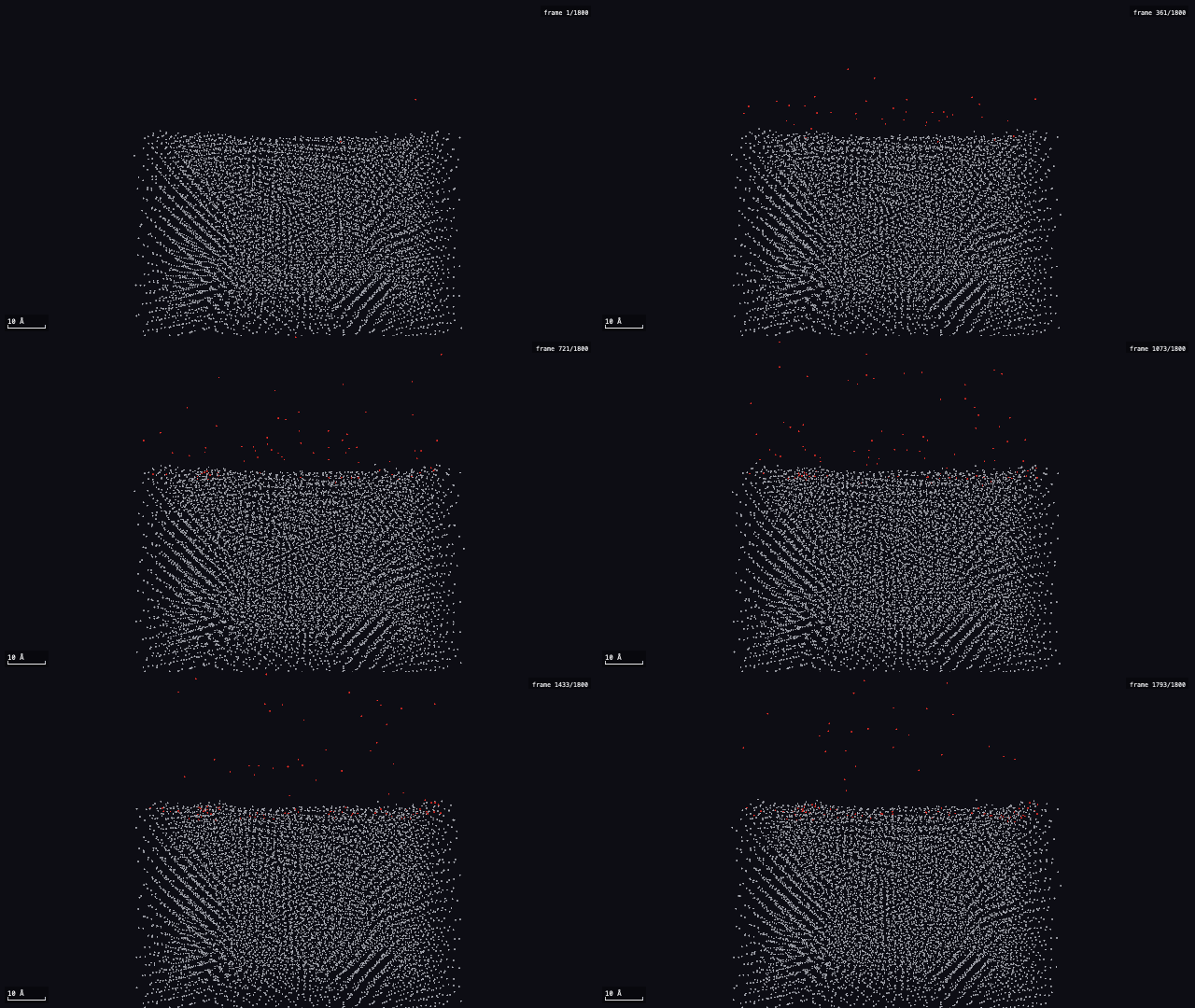
render_imageandrender_videoturn any frame or trajectory into a PNG, MP4, or GIF the agent can inspect. The clip above was made this way. - Analysis primitives —
trajectory_info,z_profile(deposition depth, surface plane, bound-probe charge),export_framewith charges,decimate.
claude mcp add mdengine /path/to/.build/release/mdengine-mcp
A submitted deck runs with your user’s privileges — LAMMPS decks are programs, not data. Read the security note before handing the job runner to an agent.
Analysis tools
15 tools, each built to answer one question about a trajectory. They run in the app’s inspector, on the command line (mdengine analyze <tool> <trajectory or run directory>) and over MCP (analyze); every result exports to CSV and Excel, and per-atom results colour the atoms in the viewer and in exported images and movies.
Surfaces & deposition
- Z-profile — Deposition/oxidation: where did the deposited species end up — penetrated, at the surface, in flight; depth histogram relative to the substrate’s top plane.
Rendering & export
- Colour by column — Colour atoms by any per-atom quantity (x/y/z, charge, c_pe, vx …) and profile its mean along an axis.
Structure & order
- Crystallinity — Is my oxide/metal amorphous or crystalline, and which phase: fcc/hcp/bcc/icosahedral/other per atom (adaptive CNA), crystalline fraction, q̄6 amorphicity, profile along z.
- PTM (orientation & grains) — Grains and orientation: template matching robust to thermal noise, per-atom lattice orientation (IPF hue), grain boundaries by disorientation, grain count — and structure type when a-CNA is too noisy.
- Grain boundaries — Grain-level answers from PTM orientations: how many grains, how big, how much of the solid is boundary, and the misorientation distribution across those boundaries.
- Conformation (RMSD · Rg · DSSP · clusters) — Is the protein holding its fold: RMSD to a reference, radius of gyration, per-atom RMSF, DSSP secondary structure, frame clustering, PCA.
- Radial distribution — How is the material packed: pair distribution g(r) for chosen species, first peak/minimum, per-atom coordination number.
Mechanics & deformation
- Diffusion (MSD) — How mobile are the atoms: unwrapped MSD vs time, Einstein diffusion coefficient with standard error.
- Thermo (log.lammps) — What did the LAMMPS run report: thermo columns aligned to frames; stress–strain and Young’s modulus when stress and box columns exist.
- Deformation — Where did the material yield: per-atom shear and volumetric strain vs a reference frame, D²min (plastic rearrangement), displacement, MSD, von Mises stress when stress columns exist.
Adhesion & binding
- Adhesion — Is the ligand still bound, and why: A–B contacts, hydrogen bonds, salt bridges, π-stacking, cation–π, hydrophobic contacts, COM/min distance, per-residue map, H-bond occupancy and lifetimes over the trajectory, rupture frame; MM/GBSA rows when mmgbsa.py side files exist.
- Pull-off energetics — What did the pull cost: F(t) from the SMD/AFM protocol’s force_curve.csv, rupture force F*, work of separation W, rupture frame; Bell–Evans across velocities and Jarzynski only when the data justify it.
- FEP results (ΔΔG) — Which compound to make next: ranked ΔΔG ± uncertainty from an OpenFE relative binding free energy run, overlap/convergence flags, cycle closure.
- Campaign matrix (tiers) — Which of my ligands, on which receptor: the ligand × receptor grid from a screening campaign as tiers with error bars — not a rank order — plus selectivity ratios, resolution floor, coverage and compromises.
- Unbinding kinetics (τRAMD) — How long does it stay bound: τRAMD residence time with bootstrap CI from tramd_times.csv, survival curve over replicas.
Each tool ships with a skill file that tells an agent when to use it (skills/tools). This list is generated from the release build’s tool registry.
Windows and Linux
The GPU tier is a plain HTTPS API, so it runs from any operating system with nothing installed. Three doors, and none of them needs a Mac or an AI agent.
In a browser. Open api.forcefieldsilicon.com/run, paste the key from your credit pack, drop the deck’s folder on the page, and watch it run: state, the cost so far, and live output, then a link to the results. Nothing is installed, and the key stays in that tab.
With curl alone. In Git Bash, WSL, PowerShell’s curl.exe, or a cluster login node:
export MDENGINE_API_KEY=mde_...   # from your credit pack
curl -fsSLO https://raw.githubusercontent.com/forcefieldsilicon/mdengine/main/scripts/hosted-curl.sh
bash hosted-curl.sh path/to/in.lmp
It creates the job, uploads the deck’s directory, starts it, polls with the cost so far, and downloads the results. The five calls behind it are documented in docs/hosted-rest.md for your own scripts and schedulers.
Through an agent. Every hosted tool — preflight, submit, status, live log, results — works from Claude Code, Claude.ai custom connectors, Cursor, or any MCP client that speaks HTTP. In PowerShell or a terminal:
claude mcp add --scope user --transport http mdengine-cloud https://api.forcefieldsilicon.com/mcp
Start claude, type /mcp, pick mdengine-cloud, choose
Authenticate. A browser page asks once for the API key from your credit pack;
paste it there, not into the chat. Your client keeps a token and the key stays with you. Decks
written on Windows (CRLF line endings) are accepted as-is.
The viewer, renderer and free local CPU runner ship for macOS today; the native Windows app below is in testing and a signed installer follows. A native Windows/Linux command line is in the works and demand sets its order — if you need it, say so.
What’s new
Every release is listed here the day it ships; the full history is CHANGELOG.md.
0.7.1 — 11 Sep 2026
- Pricing by work: the app, CLI and MCP now read how the hosted tier prices jobs from the endpoint and show it before you submit — per-class prices per billion atom-steps, the per-job base, and the wall-limit cap that a job can never exceed;
mdengine accountandjobstatus show the basis a job was billed on. - The bundled ReaxFF iron-oxidation example keeps its oxygen in the box with a reflecting ceiling; at 600 K the gas reached the fixed top face, which lost atoms on the CPU and crashed the hosted GPU run with a CUDA fault.
- Preflight (
mdengine capabilities <deck>, the app, MCP) now notes a deck with a non-periodic face and no wall fix before you submit it. - Accelerated Runs: the pre-submit dialog lets you pick the GPU class and the wall limit, recomputes the spend cap for what you picked, and describes the billing the way the hosted tier actually does it.
- New analysis tool: Grain boundaries — grain count, sizes, boundary fraction and misorientation distribution from PTM orientations; colour by grain in the viewer.
- License: MDEngine is now released under the Business Source License 1.1 — use it freely, including at work; do not resell it as a hosted service; each version becomes MPL-2.0 four years after release. 0.7.0 and earlier stay MIT.
0.7.0 — 9 Sep 2026
- Analysis tools in the inspector, the CLI and MCP: 13 tools that each answer one question — Adhesion (is the ligand still bound, and why), Pull-off energetics (what did the pull cost), Conformation (is the fold holding), Crystallinity, PTM (orientation and grains), Radial distribution, Diffusion, Deformation, Thermo (stress–strain from log.lammps), Z-profile, FEP results, Unbinding kinetics (τRAMD), Colour by column.
- Every tool result exports to CSV and Excel from its card; the Excel writer is pure Swift, so it works inside the macOS sandbox.
mdengine analyze <tool> <trajectory|run directory>on the command line and ananalyzeverb over MCP, with one skill file per tool so an agent knows when to use which.- Per-atom colour overlays with a baked legend in the viewer and in exported PNG, GIF and MP4;
render_image overlay:<tool>over MCP. - Covalent bonds and a backbone trace in the viewer and the renderer (
bonds:true). - Time-series charts follow playback: Pull-off energetics draws F(t) the moment it is added, with a cursor locked to the frame.
- A performance governor keeps the app at one draw per second when idle and schedules analysis under it; the Performance HUD shows what it is doing.
- Hosted GPU runs: submit and fetch pack and unpack tar.gz in-process, so the sandboxed app and iOS can use them; an Accelerated Runs toolbar button opens the hosted window.
- Hosted pricing groundwork: every finished job records its measured work (atom-steps) beside the metered charge; per-job prices come next and will never re-bill work already paid for.
- Hosted GPU runs refuse to bill when the pod has no working CUDA device, and relaunch once.
- Capability manifest and deck preflight before any spend: unsupported styles are routed to the full LAMMPS image or refused with the reason.
- OpenMM runner flavour for biomolecular protocols (steered pulls, AFM pull-off, τRAMD) on the same job contract as LAMMPS.
- Windows and Linux: the hosted tier works from any MCP client over HTTP with OAuth; Windows-made files (CRLF line endings) parse correctly in XYZ, dumps, decks and logs.
- MCP Registry listing carries the hosted remote; tool descriptions promise only what is offered.
- The hosted service’s server code (endpoint, billing, GPU launcher) is no longer part of this repository; the client side of the hosted tier remains here under MIT.
- Fixes: a stale progress line during a long hosted fetch (stdout flush); chain-qualified residue keys in Adhesion so both chains can have a residue 1; CRLF files that parsed to zero frames.
0.6.3 — 6 Sep 2026
- MCP Registry listing (
com.forcefieldsilicon/mdengine) gains the hosted remote atPOST /mcp(Streamable HTTP, Bearer API key); notarized.mcpbbundle rebuilt.
Release notes and checksums: GitHub releases.
Get it
MDEngine 0.7.1 for Mac — Download the DMG (2.3 MB), open it, drag MDEngine to Applications. Signed and notarized by Gitinama Inc.; macOS 14+, Apple silicon. LAMMPS (brew install lammps) is needed only to run simulations, not to view trajectories.
CLI + MCP server — mdengine-tools-0.7.1-macos-arm64.tar.gz: the mdengine command and mdengine-mcp stdio server, signed and notarized. Unpack anywhere and point your agent at mdengine-mcp.
Windows / Linux — nothing to download: use the hosted GPU tier from any MCP client.
From source — macOS 14+ and Xcode command-line tools:
git clone https://github.com/forcefieldsilicon/mdengine
cd mdengine
swift build -c release        # viewer, CLI, and MCP server
./scripts/make_app.sh         # installs /Applications/MDEngine.app
Checksums and release notes: v0.7.1 on GitHub.
Docs
The README covers all three tools, the bundled example decks (a Lennard-Jones argon melt and a ReaxFF iron oxidation), and the full MCP tool table. The app ships with its manual under Help → MDEngine Manual.
ForceField Silicon is the software brand of Gitinama Inc., a Delaware corporation registered in Massachusetts. Code signatures, invoices and receipts carry the legal name Gitinama Inc.

